

JavaScript Template Literals: AST Parsing, String.raw Semantics, and Tagged Template Metaprogramming
An engineering breakdown of template literal compilation, V8 call-site caching, raw vs cooked escapes, and tagged DSL security.
1. Executive Summary & Semantic Core
In ECMAScript 2015 (ES6+), Template Literals provide an advanced syntactic construct for dynamic string interpolation, multiline formatting, and compile-time AST introspection. Beyond substituting the legacy string concatenation operator (+), template literals execute through specific ECMAScript evaluation semantics: untagged template literals dynamically evaluate embedded expressions (${...}) within an isolated Lexical Environment and concatenate them into immutable UTF-16 strings; tagged template literals convert strings and expressions into decoupled Abstract Syntax Tree arguments (TemplateStringsArrayand rest values), enabling compile-time AST interception, zero-allocation domain-specific languages (DSLs), parameterized SQL query sanitization, and runtime CSS-in-JS compilation.
2. Low-Level Mechanics: Untagged vs. Tagged Evaluation Pipeline
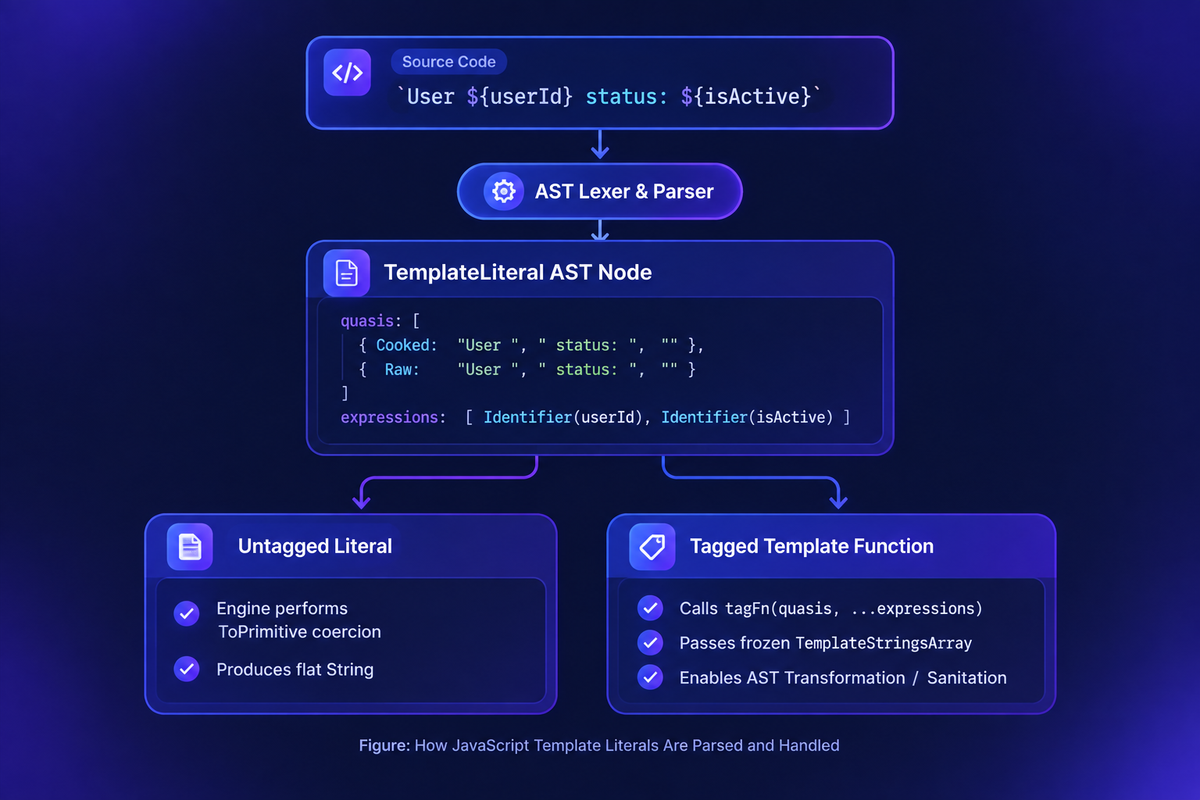
When the JavaScript engine encounters a backtick token sequence, it parses the expression into an alternating sequence of static string slices and dynamic expressions:
| Evaluation Mode | Syntax | Argument Architecture | Memory & Engine Lifecycle |
|---|---|---|---|
| Untagged Literal | `Hello ${name}` | Standard expression evaluation | Evaluates expressions, coerces via ToString(), concatenates into a single string. |
| Tagged Literal | tagFn`Hello ${name}` | (strings: TemplateStringsArray, ...values: any[]) | Allocates a frozen static array for string fragments; isolates expression values for interception. |
| Raw String Access | String.raw`C:\temp` | Uses strings.raw array | Bypasses escape sequence processing (e.g., preserves literal \n, \t, \U). |
3. Deep-Dive: Tagged Templates as Domain-Specific Compilers
A tagged template is a function invocation where the arguments are dissected by the engine before evaluation. The first parameter is a TemplateStringsArray (a frozen array containing the static string slices), followed by the evaluated interpolation values.
The TemplateStringsArray Invariant & V8 Call-Site Caching
The engine freezes the TemplateStringsArray object via Object.freeze() and caches it against the AST call-site. Repeated executions of the same tagged template reuse the exact same array reference in heap memory:
Security Engineering: Preventing Injection Attacks
Tagged templates provide parameter isolation, enabling the safe construction of database queries and shell commands without manual escaping:
4. Raw String Internals: String.raw vs. Cooked Escape Sequences
In standard string literals, escape sequences like \n (line feed, ASCII 10) or \u00A9 (copyright symbol) are interpreted ("cooked") by the engine parser. The String.raw tag accesses the raw, unescaped string slices directly from the AST:
5. Performance Diagnostics: Memory Footprint & Concatenation Topologies
Concatenation Performance: + vs. Template Literals
Under modern V8 compilation pipelines (Ignition bytecode interpreter & TurboFan JIT compiler), untagged template literals compile to bytecode instructions functionally identical to the + operator:
The Multiline Indentation Memory Pitfall
Multiline template literals preserve every whitespace character, tab, and newline directly into the string buffer. In high-frequency rendering pipelines, this causes unnecessary heap growth:
6. Enterprise Best Practices & ESLint Rules
- Enforce Template Literals over Complex String Concatenation: Configure ESLint's
prefer-templaterule to replace dynamic string chains with clean interpolation syntax. - Prohibit Raw SQL/HTML String Interpolation: Ban naive template strings like
db.query(`SELECT * FROM ${table}`); enforce tagged template compilers (e.g., Prisma, pg-promise, or custom sanitizers) to eliminate injection vectors. - Guard Against Accidental Array String Coercion: Interpolating arrays (e.g.,
`Selected: ${[1, 2, 3]}`) callsArray.prototype.toString(), producing unformatted comma-delimited strings ("Selected: 1,2,3"). Explicitly call.join(", ")for predictable presentation boundaries.



Leave a Reply
Share your insights, questions, or solutions with the developer community.
Discussion
0No comments yet
Be the first to share your thoughts, question a concept, or provide additional tips!