

Introduction to TypeScript
Build safer and scalable JavaScript applications with modern static typing
TypeScript is a statically typed superset of JavaScript that compiles to plain JavaScript. It adds features like static typing, interfaces, generics, and modern ECMAScript support, helping developers catch errors early and build scalable applications with better tooling such as autocompletion, refactoring, and debugging.
- It is a compiled language, meaning TypeScript code is first converted into JavaScript before execution.
- Strong typing reduces runtime errors.
- It makes code more predictable, maintainable, and easier to debug.
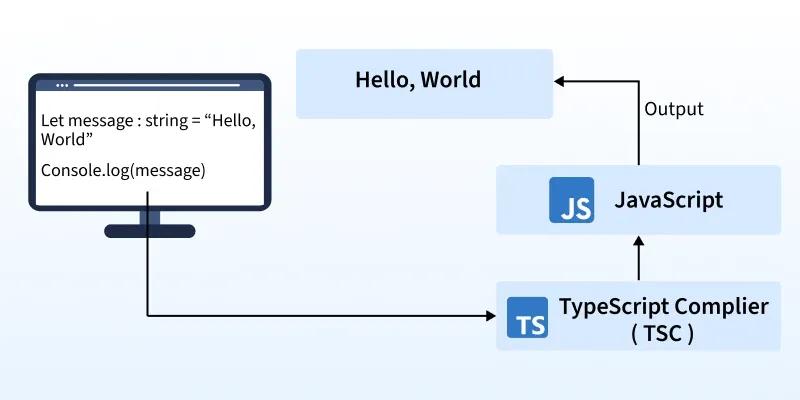
"Hello, World!" Program in TypeScript
A "Hello, World!" program is the simplest way to get started with any programming language. Here’s how you can write one using TypeScript.
In Browser (via Compilation)
Create a file hello.ts:
Now compile it into JavaScript using:
This will generate a hello.js file, which can then be included in your HTML.
In Node.js Console: Simply run the compiled JavaScript:
Output:
Comments in JavaScript
Comments are notes in your code that the TypeScript interpreter ignores. They’re great for explaining what your code does or for testing purposes.
- Single-line comment: Starts with //
- Multi-line comment: Enclosed in /* */
Client Side and Server Side Nature of TypeScript
TypeScript’s flexibility extends to both the client-side and server-side, allowing developers to create complete, scalable applications. Here’s how it functions in each environment:
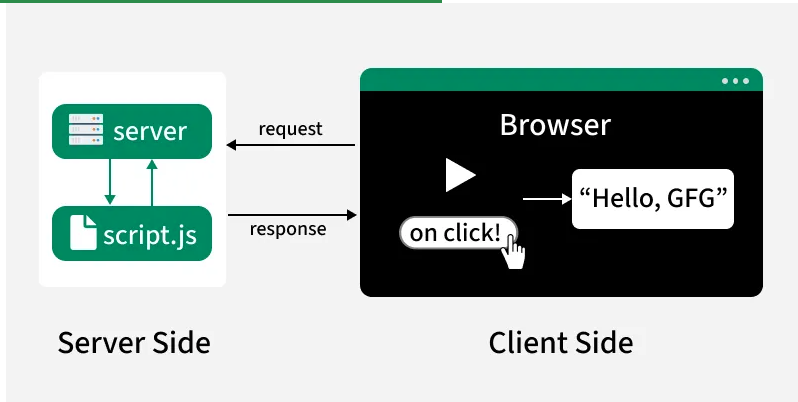
Client-Side:
- Used for controlling the browser and its DOM (Document Object Model).
- Handles user events like clicks, form inputs, and rendering dynamic content.
- Common frameworks and libraries like Angular, React, and Vue offer strong TypeScript support for building large-scale front-end applications.
Server-Side:
- Used for interacting with databases, handling APIs, file manipulation, and generating responses.
- Node.js with TypeScript, along with frameworks like Express or NestJS, is widely used to build type-safe backend applications.
- Type definitions help catch errors early and make server-side code more reliable and maintainable.
JavaScript Vs TypeScript
Here are the detailed difference between JavaScript and TypeScript:
| JavaScript | TypeScript |
|---|---|
| A lightweight, interpreted scripting language used for web development. | A superset of JavaScript that adds static typing and advanced features. |
| Dynamically typed (types are checked at runtime). | Statically typed (optional) – types are checked at compile time. |
| Runs directly in browsers or Node.js (no compilation needed). | Must be compiled to JavaScript using the TypeScript compiler (tsc). |
| Errors appear only at runtime | Errors are caught at compile time, reducing runtime bugs. |
| Prototype-based object-oriented programming. | Class-based object-oriented programming with interfaces, access modifiers, generics. |
| Supports ES6+ features depending on the environment. | Supports all modern ES6+ features, plus extra TypeScript-only features. |
| Basic editor support, limited IntelliSense. | Rich tooling with autocompletion, type checking, and refactoring support. |
| Runs everywhere (browser, Node.js, servers) | Used in large-scale applications, compiled to JS for execution. |
Adding TypeScript File in HTML Code
Here are the steps for adding TypeScript file in html code:
1. Create the TypeScript File (types.ts)
- myString is declared as a string variable.
- It's assigned the value 'Hello from TypeScript'.
- The value is logged to the console.
2. Compile TypeScript to JavaScript
Use the TypeScript compiler (tsc) to transpile types.ts into JavaScript. Open your terminal and run:
This command generates a types.js file containing the equivalent JavaScript code.
3. Create the HTML File (index.html)
- A heading and a paragraph for content.
- A script tag that references the compiled JavaScript file types.js.
4. Run the HTML File
Open index.html in a web browser.
Limitations of TypeScript
Despite its power, TypeScript has some limitations to consider:
- Compilation Overhead: Must be compiled into JavaScript before execution.
- Learning Curve: Developers must learn types, generics, and advanced concepts.
- Configuration Complexity: Large projects may require detailed tsconfig.json setup.
- Extra Build Step: Slower feedback loop compared to plain JavaScript.



Leave a Reply
Share your insights, questions, or solutions with the developer community.
Discussion
0No comments yet
Be the first to share your thoughts, question a concept, or provide additional tips!