
Pooling Layer in CNN Explained: Max Pooling vs Average Pooling
Understand how pooling reduces dimensions and improves deep learning models.
Pooling layer is used in CNNs to reduce the spatial dimensions (width and height) of the input feature maps while retaining the most important information. It involves sliding a two-dimensional filter over each channel of feature map and summarizing the features within the region covered by filter.
For a feature map with dimensions nh×nw×nc, the dimensions of the output after a pooling layer are:
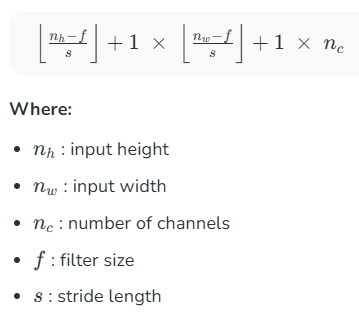
Note: Number of channels remains unchanged.

Why are Pooling Layers Important?
- Dimensionality Reduction: Faster computation, fewer parameters
- Translation Invariance: Small shifts in image don’t affect output
- Overfitting Control: Acts as regularization
- Feature Hierarchy: Helps focus on high-level patterns
Example: Even if a cat moves slightly in an image, pooling ensures the model still recognizes it.
Types of Pooling Layers
1. Max Pooling
Max pooling selects the maximum element from the region of the feature map covered by the filter. Thus, the output after max-pooling layer would be a feature map containing the most prominent features of the previous feature map.
Max pooling layer preserves the most important features (edges, textures, etc.) and provides better performance in most cases
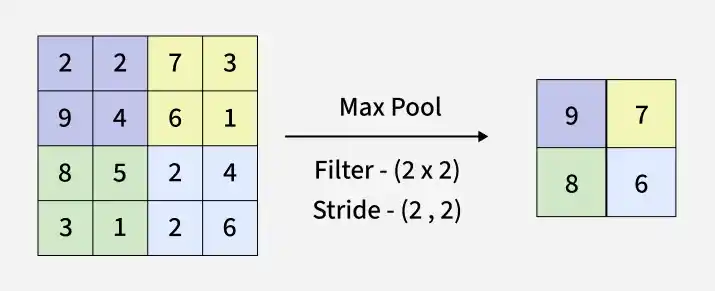
Max Pooling in Keras:
Output:
2. Average Pooling
Average pooling computes the average of the elements present in the region of feature map covered by the filter. Thus, while max pooling gives the most prominent feature in a particular patch of the feature map, average pooling gives the average of features present in a patch.
Average pooling provides a more generalized representation of the input. It is useful in the cases where preserving the overall context is important.
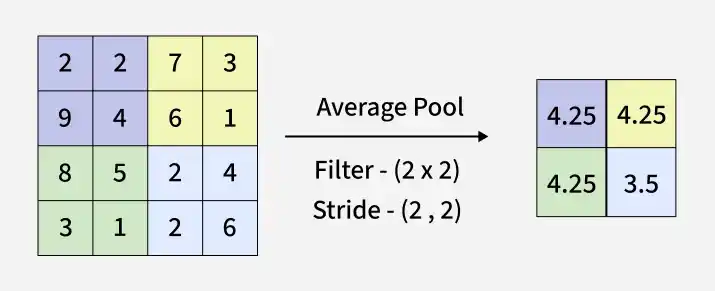
Average Pooling using Keras:
Output:
3. Global Pooling
Global pooling reduces each channel in the feature map to a single value, producing a 1×1×nc1×1×nc output. This is equivalent to applying a filter of size nh×nwnh×nw.
There are two types of global pooling:
- Global Max Pooling: Takes the maximum value across the entire feature map.
- Global Average Pooling: Computes the average of all values in the feature map.
Global Pooling using Keras:
Output:
How Pooling Layers Work?
- Define a Pooling Window (Filter): The size of the pooling window (e.g., 2x2) is chosen, along with a stride (the step size by which the window moves). A common choice is a 2x2 window with a stride of 2, which reduces the feature map size by half.
- Slide the Window Over the Input: The pooling operation is applied to each region of the input feature map covered by the window.
- Apply the Pooling Operation: Depending on the type of pooling (max, average, etc.), the operation extracts the required value from each window.
- Output the Downsampled Feature Map: The result is a smaller feature map that retains the most important information.
Key Hyperparameters
- Filter Size (f): Larger = more compression
- Stride (s): Larger = faster reduction
- Padding: Ensures edge coverage
Advantages of Pooling Layer
- Dimensionality Reduction: Reduces feature map size, lowering computation and helping prevent overfitting.
- Translation Invariance: Detects features even if their position shifts in the image.
- Feature Selection: Retains important features (max pooling) or captures overall context (average pooling).
Limitations of Pooling Layers
- Information Loss: Pooling reduces spatial resolution, which can lead to a loss of important fine details.
- Over-smoothing: Excessive pooling may blur out crucial features.
- Hyperparameter Tuning: The choice of pooling size and stride affects performance and requires careful tuning.
First Lesson
You are at the beginning of this curriculum.
Latest Tutorial
More chapters coming soon to this topic.

Leave a Reply
Share your insights, questions, or solutions with the developer community.
Discussion
0No comments yet
Be the first to share your thoughts, question a concept, or provide additional tips!