
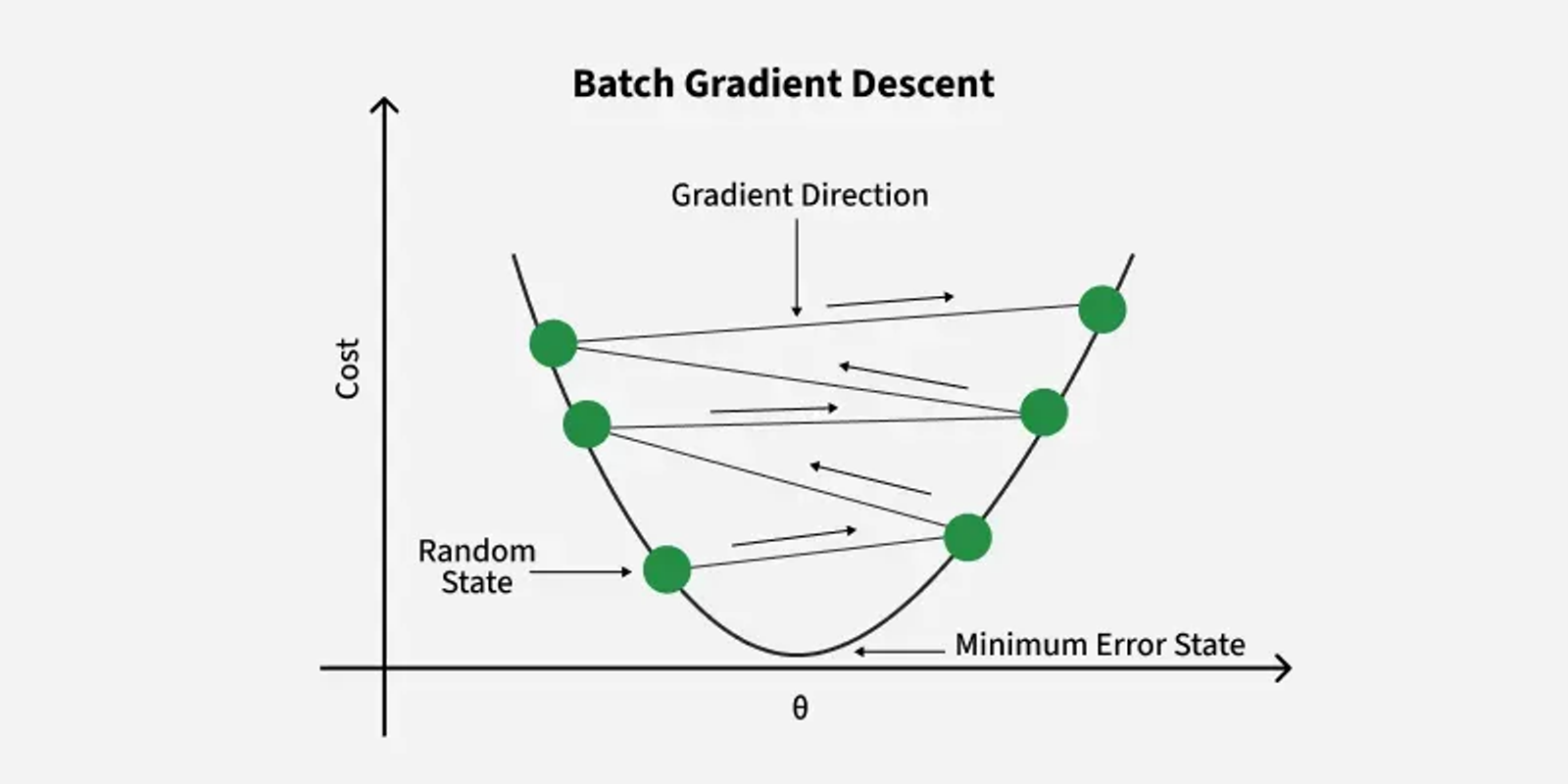
Gradient Descent in Linear Regression: How It Optimizes Your Model
A Complete Guide to Understanding How Gradient Descent Finds the Best Fit Line
Gradient Descent is an optimization algorithm used in linear regression to find the best-fit line for the data. It works by gradually adjusting the line’s slope and intercept to reduce the difference between actual and predicted values. This process helps the model make accurate predictions by minimizing errors step by step.
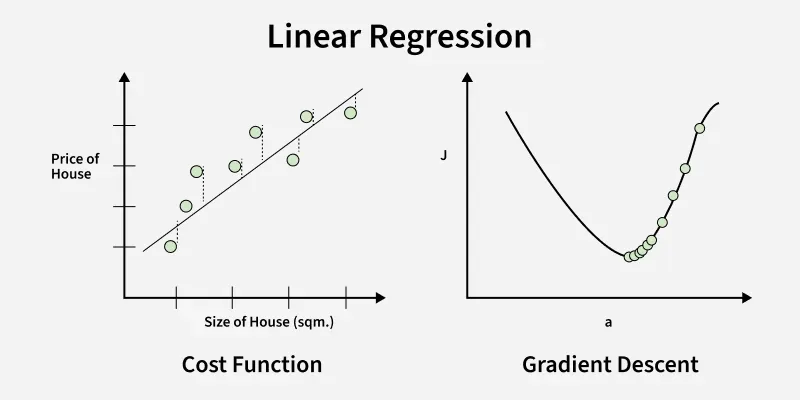
The above image shows two graphs, left one plots house prices against size to show errors measured by the cost function while right one shows how gradient descent moves downhill on the cost curve to minimize error by updating parameters step by step.
Importance
Linear regression finds the best-fit line for a dataset by minimizing the error between the actual and predicted values. This error is measured using the cost function usually Mean Squared Error (MSE). The goal is to find the model parameters, the slope m and the intercept b that minimize this cost function.
For simple linear regression, we can use formulas like Normal Equation to find parameters directly. However for large datasets or high-dimensional data these methods become computationally expensive due to:
- Large matrix computations.
- Memory limitations.
In models like polynomial regression, although the relationship between input features and output is non-linear, the cost function remains convex and an analytical solution (Normal Equation) still exists. However, for large datasets or high-dimensional data, Gradient Descent is preferred due to better computational efficiency.
Working of Gradient Descent in Linear Regression
Lets see various steps involved in the working of Gradient Descent in Linear Regression:
1. Initializing Parameters: Start with random initial values for the slope (mm) and intercept (bb).
2. Calculate the Cost Function: Measure the error using the Mean Squared Error (MSE):
J(m, b) = \frac{1}{n} \sum_{i=1}^{n} \left( y_i - (mx_i + b) \right)^23. Compute the Gradient: Calculate how much the cost function changes with respect to mmand bb.
- For slope mm :
\frac{\partial J}{\partial m} = -\frac{2}{n} \sum_{i=1}^{n} x_i \left( y_i - (mx_i + b) \right)- For intercept b:
\frac{\partial J}{\partial b} = -\frac{2}{n} \sum_{i=1}^{n} \left( y_i - (mx_i + b) \right)4. Update Parameters: Change mm and bb to reduce the error:
- For slope m :
m = m - \alpha \cdot \frac{\partial J}{\partial m}- For intercept b:
b = b - \alpha \cdot \frac{\partial J}{\partial b}Here αα is the learning rate that controls the size of each update.
5. Repeat: Keep repeating steps 2–4 until the error stops decreasing significantly.
Implementation of Gradient Descent in Linear Regression
Let’s implement linear regression step by step. To understand how gradient descent improves the model, we will first build a simple linear regression without using gradient descent and observe its results.
Here we will be using Numpy, Pandas, Matplotlib and Scikit-learn libraries for this.
- X, y = make_regression(n_samples=100, n_features=1, noise=15, random_state=42): Generating 100 data points with one feature and some noise for realism.
- X_b = np.c_[np.ones((m, 1)), X]: Adding a column of ones to X to account for the intercept term in the model.
- theta = np.array([[2.0], [3.0]]): Initializing model parameters (intercept and slope) with starting values.
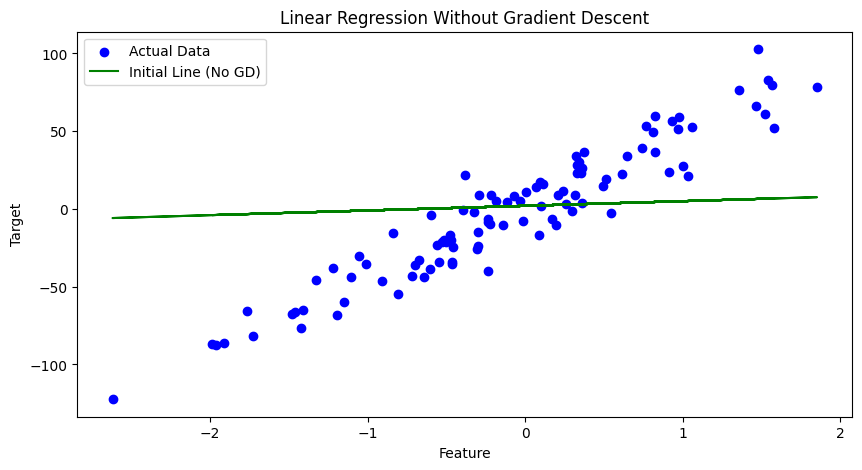
Here the model’s predictions are not accurate and the line does not fit the data well. This happens because the initial parameters are not optimized which prevents the model from finding the best-fit line.
Now we will apply gradient descent to improve the model and optimize these parameters.
- learning_rate = 0.1, n_iterations = 100: Set the learning rate and number of iterations for gradient descent to run respectively.
- gradients = (2 / m) * X_b.T.dot(y_pred - y): Finding gradients of the cost function with respect to parameters.
- theta -= learning_rate * gradients: Updating parameters by moving opposite to the gradient direction.
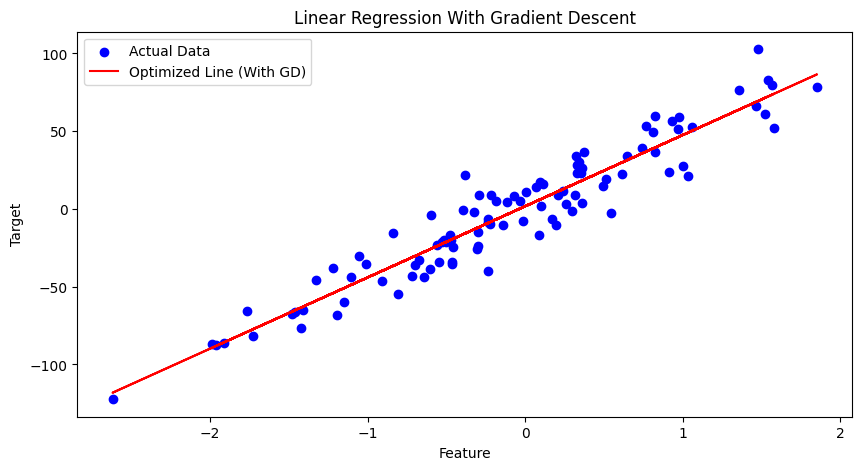
Linear Regression with Gradient Descent shows how the model gradually learns to fit the line that minimizes the difference between predicted and actual values by updating parameters step by step.
First Lesson
You are at the beginning of this curriculum.
Latest Tutorial
More chapters coming soon to this topic.

Leave a Reply
Share your insights, questions, or solutions with the developer community.
Discussion
0No comments yet
Be the first to share your thoughts, question a concept, or provide additional tips!