

DOM Event Architecture: Event Loop Coordination, Propagation Phases, and Memory-Safe Delegation
An engineering deep-dive into the capturing/bubbling phases, event delegation patterns, passive listeners, and AbortController teardowns.
1. Executive Summary & Semantic Core
In modern browser engines, a DOM event is an asynchronous message object dispatched through the DOM tree by browser APIs or direct user interactions. Rather than executing inline script attributes, enterprise web applications handle events via the standardized EventTarget interface (addEventListener). Execution coordinates with the Browser Event Loop, queuing event callbacks into the Task (Macrotask) Queue. Mastering the three-phase propagation lifecycle—Capturing, Target, and Bubbling—along with the Event Delegation Pattern and explicit cleanup lifecycle management is required to eliminate UI thread blocking, prevent memory leaks from detached DOM nodes, and ensure sub-100ms interaction latency.2. Event Propagation Pipeline: The Three-Phase Lifecycle
When an event triggers on a nested node, the browser does not merely fire the listener on that target element. Instead, it dispatches an Event object through the document tree in a deterministic, bidirectional traversal path:
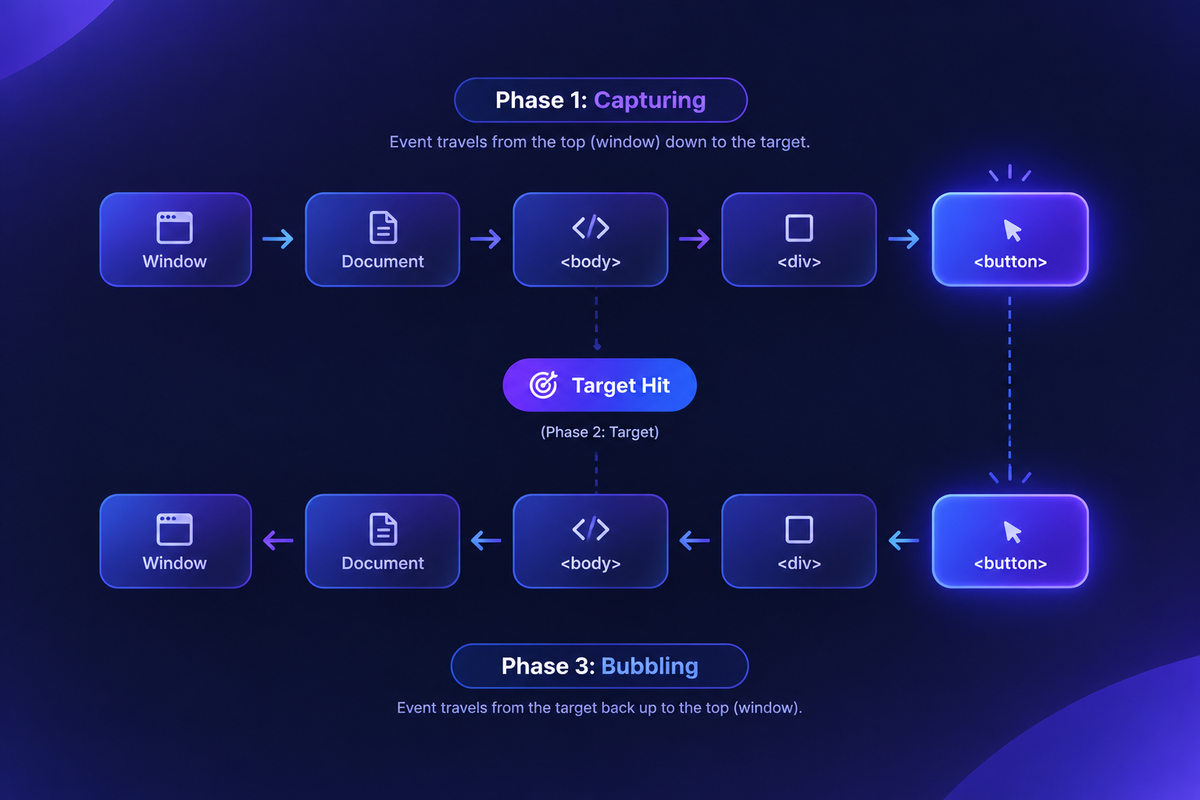
| Propagation Phase | Phase Constant | Direction of Travel | Listener Activation Requirement |
|---|---|---|---|
| 1. Capturing Phase | Event.CAPTURING_PHASE | op-down (Window $\rightarrow$ Target parent) | Configured explicitly via { capture: true } |
| 2. Target Phase | Event.AT_TARGET | Evaluated at the registered event origin | Triggers on the target node itself |
| 3. Bubbling Phase | Event.BUBBLING_PHASE | Bottom-up (Target parent $\rightarrow$ Window) | Standard default ({ capture: false }) |
Propagation Interception Commands
event.stopPropagation(): Prevents the event from traveling further along the propagation chain (stops capturing or bubbling), but allows sibling listeners on the current node to execute.event.stopImmediatePropagation(): Halts propagation and immediately prevents any remaining listeners attached to the current element from executing.event.preventDefault(): Cancels the browser's default native behavior (e.g., stopping form submission or preventing link navigation) without halting propagation.
3. Deep-Dive: Event Delegation Architecture
Attaching individual event listeners to high-cardinality elements (e.g., dynamic tables, infinite-scroll lists) bloats the V8 heap and creates garbage collector stalls. The Event Delegation Pattern leverages the Bubbling Phase to bind a single listener to a stable ancestor container.
4. Modern addEventListener Options: Passive & Signal Control
Modern ECMAScript and DOM specifications provision advanced configuration flags via the third parameter of addEventListener:
5. Memory Management: Detached DOM Node Leaks
A major source of memory leaks in Single Page Applications (SPAs) is retaining references to DOM elements via event listeners. If a DOM node is removed from the tree but retains an active event listener with a closure referencing an outer scope, the engine's Garbage Collector cannot free either the node or its lexical environment.
Memory Guard: Always mirror everyaddEventListenerwith a correspondingremoveEventListener, or manage subscriptions deterministically usingAbortSignal.
6. Enterprise Best Practices & ESLint Rules
- Strict Prohibition of Inline Event Attributes: Enforce ESLint's
react/no-unknown-propertyor security linters to disallow inline attributes likeonclick="". Inline handlers introduce Cross-Site Scripting (XSS) risks and violate Content Security Policies (CSP). - Enforce Passive Listeners on Touch/Wheel Hooks: Always pass
{ passive: true }on touch/scroll listeners unless cancellation of default scrolling behavior is strictly required. - Normalize Keyboard Interactions: Pair click events with keyboard equivalents (
keydownchecking forEnterorSpace) to fulfill WCAG 2.2 AA accessibility requirements.
First Lesson
You are at the beginning of this curriculum.
Latest Tutorial
More chapters coming soon to this topic.

Leave a Reply
Share your insights, questions, or solutions with the developer community.
Discussion
0No comments yet
Be the first to share your thoughts, question a concept, or provide additional tips!